
Your D365 finance automation has a gap. Here’s what it is
Microsoft Dynamics 365 Finance is one of the most capable ERP platforms available. Finance teams use it to manage vendor payments, reconcile bank statements, handle direct debits and gain visibility across their financial operations.
But there is one thing it cannot do out of the box – and it is the thing most finance teams assume it already handles.
D365 cannot connect directly to your bank.
D365 does the reconciliation. But it has no way to connect to your bank. Someone still has to log in, download the file, and upload it manually.
D365 does the reconciliation. But it has no way to connect to your bank. Someone still has to log in, download the file, and upload it manually.
What that means in practice
When your team generates a vendor payment run in D365, the system creates the payment file. Then someone – usually an accountant or a finance officer – has to log into the bank portal, upload that file manually, and wait for confirmation.
The same happens in reverse. To get bank statements into D365 for reconciliation, someone has to log into the portal, download the statement, and either upload it via SharePoint or import it directly. Every day. For every bank account.
For a retail business running multiple entities, managing payments alongside international transfers, or processing high volumes of direct debits – that manual layer adds up to hours every week. Hours spent on work that adds no analytical value, introduces room for error, and costs money in accountant time.
Why most teams don’t realise this is a gap
Because D365 does so much well. The reconciliation engine matches transactions. The payment module generates files. The reporting gives visibility. It all works – up to the moment it needs to talk to a bank.
At that point, the process breaks out of the ERP entirely. A human steps in. A file moves. And then it comes back.
Most finance teams have been doing this for so long that it feels normal. It is not a gap in their process – it is just how it works. The question worth asking is: does it have to?
Finance teams using bank connectivity automation typically recover 30–40% of the time currently spent on manual banking and payment tasks.
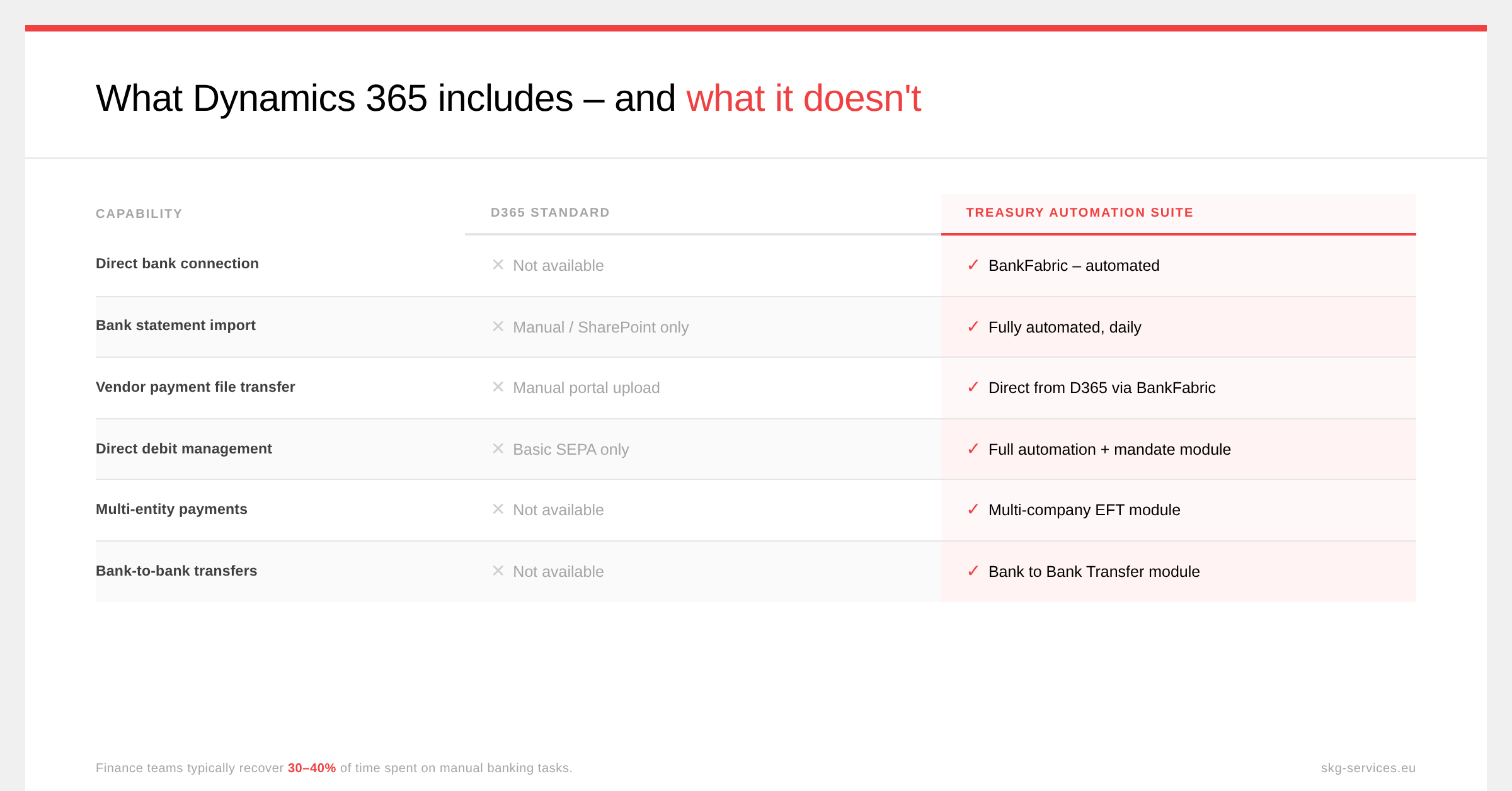
D365 standard vs Treasury Automation Suite – the key gaps at a glance
The table below covers the six areas where the difference is most visible for finance teams running D365 today.
What bank connectivity automation actually does
The Treasury Automation Suite is a certified D365 add-on that creates a secure, direct connection between your D365 environment and your banks – any bank, in any country, supporting over 2,400 file formats worldwide.
The result is not just time saved. It is a finance team that operates entirely inside one system – with a complete audit trail, no manual file movement, and real-time visibility across all banking activities. Finance teams typically recover 30–40% of the time previously spent on these tasks.
Who this matters most for
The impact is highest for finance teams that:
- Manage multiple bank accounts or multiple legal entities
- Process high volumes of vendor payments or direct debits
- Operate across multiple countries or currencies
- Have lean finance teams where each person carries a broad workload
- Are already running D365 and want to extract more value from their existing investment
We have implemented this for over 1,700 companies globally – including retail businesses, food and FMCG groups, shipping companies and pharma groups running D365 across the Netherlands and beyond.
The consistent response after implementation: “I didn’t realise D365 couldn’t already do this.”
Curious whether this gap exists in your D365 setup? Contact us and let’s take an honest look at where automation can save your finance team time.
Ready to Automate Your Financial Operations?
Schedule a conversation to see how secure automation can improve efficiency and accuracy for your banking and treasury transactions.